Guide · 1567 words · updated 2026-11-23
How to buy USDT on P2P, step by step
Buying USDT from a stranger is scary the first time, but the process is the same on every exchange and, done in order, it's quite safe. Here's everything, start to finish.
In this guide · 16 sections
- How P2P works in two lines
- Before you start: what you need
- Step 1: compare the price before you go in
- Step 2: open the P2P section and filter
- Step 3: choose the ad carefully
- Step 4: open the order and pay
- Step 5: wait for the release
- Which exchange to choose
- What you'll see on the order screen
- If something goes wrong
- Common beginner mistakes
- After buying: what to do with your USDT
- Choosing the right payment method
- Common mistakes when buying for the first time
- After you receive your USDT
- How much does buying on P2P cost?
How P2P works in two lines
On P2P you don't buy from the exchange: you buy from a person or a merchant who posted an ad. The exchange acts as referee. When you open an order, the seller's USDT is locked in escrow. You pay outside the exchange — bank transfer, wallet, etc. — and once the seller confirms the money arrived, the exchange releases the USDT to you.
That lock is what protects you: the seller can't keep both your money and the USDT, because while the order is open the USDT isn't theirs to move. If there's a problem, exchange support reviews the case with the funds still locked. That's why the golden rule is never leave the order.
Before you start: what you need
- An account on the exchange you'll use (Binance, OKX, Bybit, Bitget or HTX). It's free.
- Completed identity verification (KYC): your ID document and a selfie. You can't trade P2P without it.
- A bank account or wallet in your own name. The name on the account you pay from must match your exchange account. This is P2P's most important rule: paying from a relative's or friend's account can get the order cancelled or your account limited.
- A quiet moment. Once you open the order you have limited time to pay (often about 15 minutes, though each advertiser can set their own). Don't open it if you're in a hurry or have poor signal.
Step 1: compare the price before you go in
Each exchange is its own market, and within each one the price changes with the payment method and the amount. On CoinCTC you see all five exchanges together: open your country's page, enter how much you want to buy and how you'll pay, and we show who sells cheapest right now, with their track record.
Watch out for the ad shown first: many exchanges pin a "promoted ad" at the top that isn't always the cheapest. Look at the price, not the position.
Step 2: open the P2P section and filter
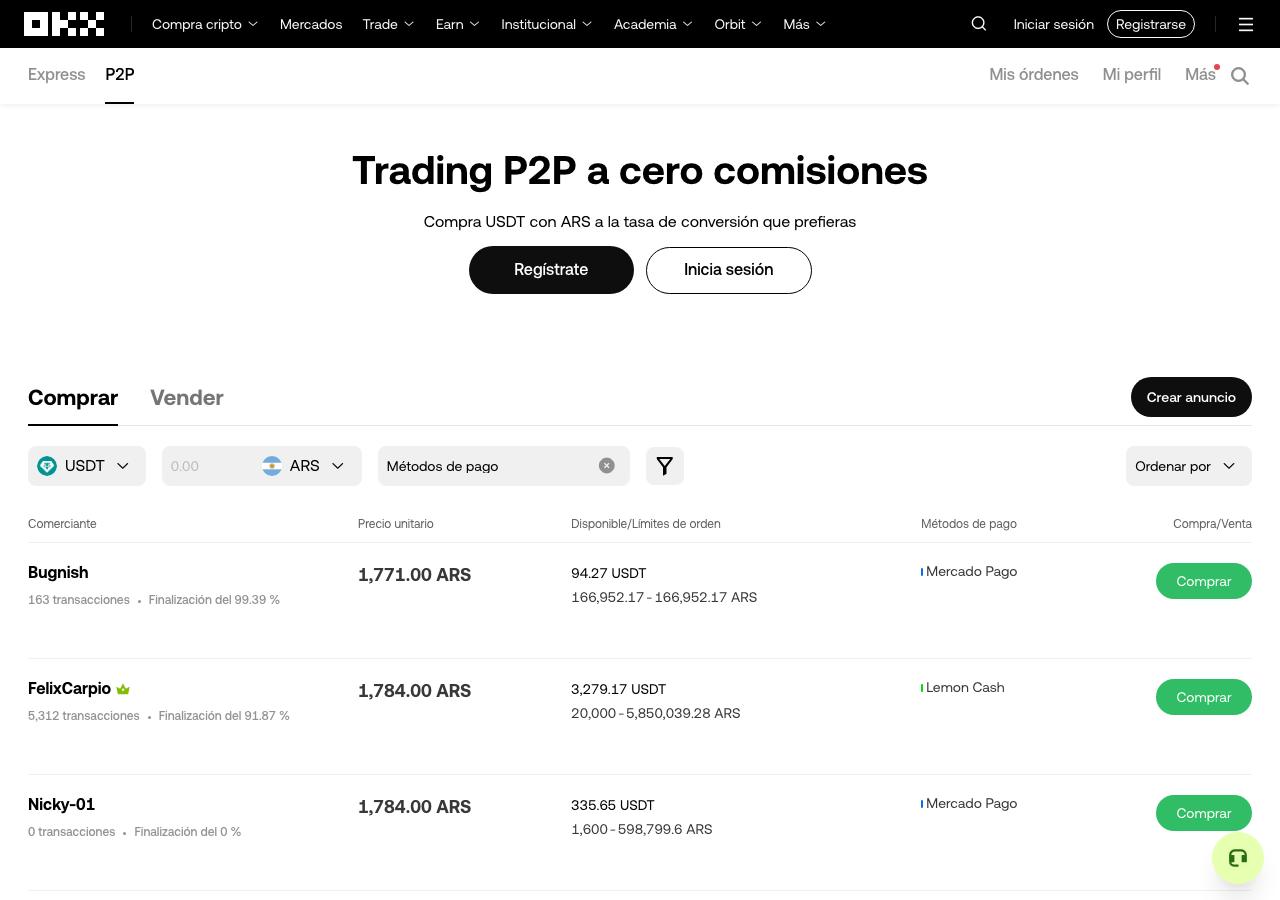
In the exchange app or website look for "P2P". Choose Buy, the currency USDT and your local currency. Then use the filters: type the amount you want to spend and pick your payment method, so the list only shows ads that accept your order.
Step 3: choose the ad carefully
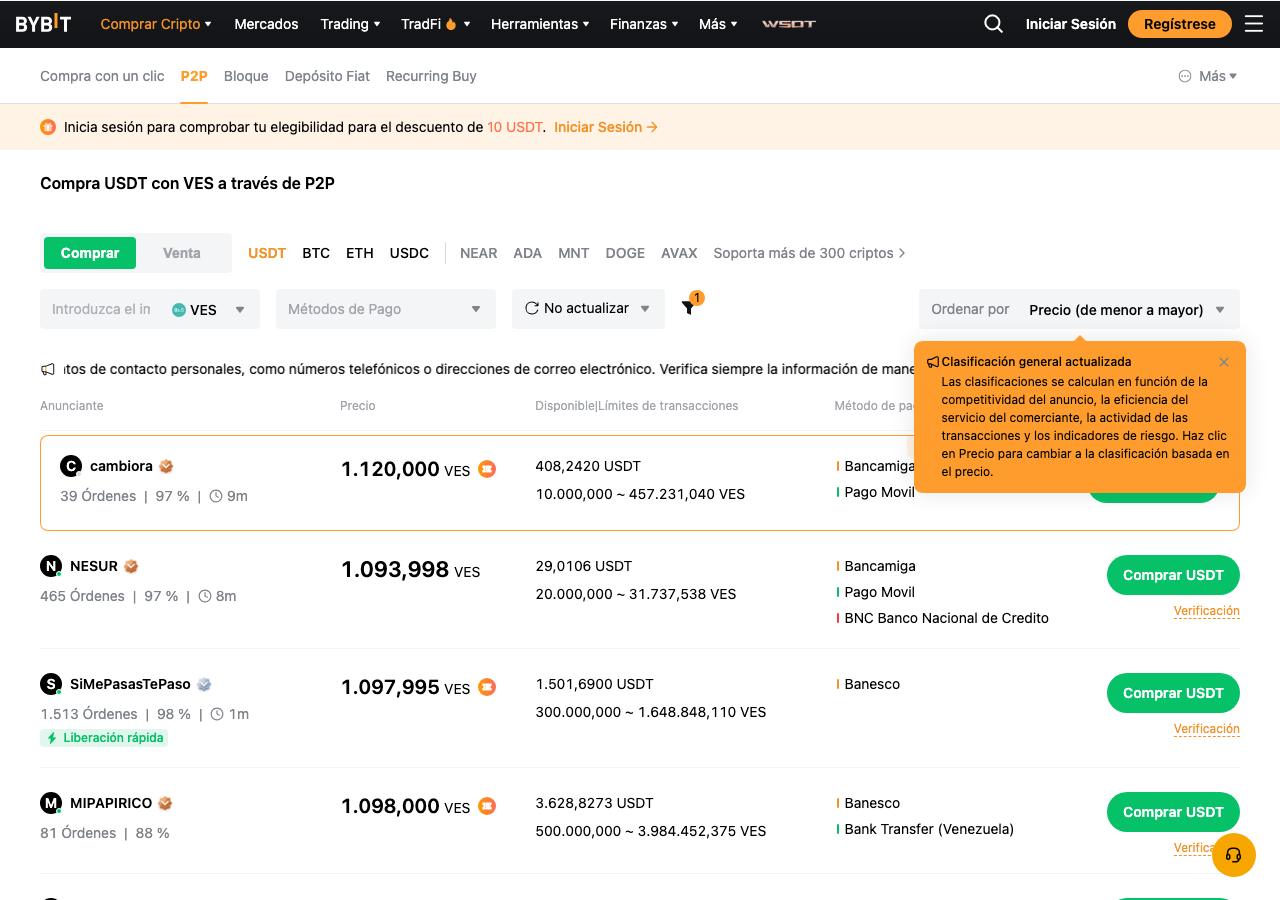
Each ad shows several things. Take a minute to read them:
- Price: what you pay per USDT.
- Available and limits: how much USDT the seller has and the minimum and maximum per order. Your amount must fit.
- Orders and completion rate: how many trades they've done and what share they completed. Above 95% and hundreds of orders is a good sign.
- Release or payment time: how long they usually take to release, and how long you have to pay.
- Badges: merchants verified by the exchange itself usually carry a special mark.
- Ad terms: some ask for extra verification, don't accept third-party payments or have set hours. Read them before opening the order.
Step 4: open the order and pay
- Enter the amount in your currency or in USDT and confirm. From now on the seller's USDT is locked and the clock is running.
- Read the payment details shown in the order: bank or wallet, account number, alias or phone, and the account holder's name.
- Pay from your own account the exact amount. If your app shows the recipient's name, check it matches the seller.
- Don't write "USDT", "crypto" or the exchange's name in the transfer reference. Leave it blank or generic.
- Mark the order as paid only after you've actually transferred. Marking it without paying gets penalised.
- Upload the receipt in the order chat if asked.
Step 5: wait for the release
Now it's the seller's turn: they need to see your money and release the USDT. With instant transfers this usually takes a few minutes. When they do, the USDT appears in your funding (or P2P) wallet on the exchange. From there you can keep it, move it to your main wallet or send it to someone.
If minutes pass and they don't release, message them calmly in the order chat. Often the seller's bank is just slow to show the payment.
Which exchange to choose
The five exchanges we compare work in similar ways but aren't identical. Binance has the most ads in almost every country in the region, so more variety of prices and payment methods. OKX promotes zero-fee P2P and has good volume in several countries. Bybit and Bitget have grown a lot in Latin America and sometimes offer better prices for certain amounts. HTX has fewer ads in the region but occasionally shows competitive prices.
You don't need an account everywhere. One or two verified accounts are enough; check CoinCTC for where the best price is for your amount.
What you'll see on the order screen
- Timer: how long you have left to pay. When it runs out, the order cancels itself.
- Payment details: bank or wallet, account number, alias, phone and holder's name.
- Amount to pay: exactly what you must transfer.
- Chat: the only place to talk to the seller. It's recorded for support if there's an appeal.
- "Paid" button: only tap it after paying.
- Appeal: appears if time passes without a release. It's your tool to claim.
If something goes wrong
If you've paid and the seller doesn't release within the stated time, don't cancel the order. Cancelling returns the USDT to the seller and leaves you unprotected. Instead, open an appeal from the order, attach your receipt and explain what happened. Exchange support reviews the case with the funds still locked.
If you made a mistake and haven't paid yet, cancel without guilt: it's better to cancel than to pay wrongly. Cancelling many times may limit your account for a while, though.
Common beginner mistakes
- Paying from someone else's account (partner, parent, friend).
- Marking as paid before transferring, "to save time".
- Moving the conversation to WhatsApp because the seller asked.
- Picking the cheapest ad without checking limits or history.
- Transferring an amount different from the order.
- Cancelling an order you already paid because the seller asked you to.
After buying: what to do with your USDT
You have three options. The simplest is to leave it on the exchange. It's convenient for selling or sending later, but you depend on the exchange's security; turn on two-factor authentication and use a unique password.
The second is to move it to your own wallet, where only you hold the keys. It gives you more control and more responsibility: if you lose your recovery phrase, nobody can give the funds back. Remember to choose the right network when withdrawing.
The third is to use it: send it to someone, pay for a service or sell it later on P2P. If you plan to sell soon, compare the sell price first: the gap between buying and selling is the cost of the round trip.
Choosing the right payment method
The payment method changes both the price and the speed. Instant options — national instant transfers, mobile wallets such as Yape, Nequi, Mercado Pago or Pago Móvil — let the seller confirm in minutes, so orders close quickly. Slower bank transfers can take longer to show up, and some sellers charge a little more to accept them or simply don't.
Pick a method you already use, in your own name, with enough daily limit for your amount. On CoinCTC you can filter by payment method and see the best price for exactly that method, which is often a few pesos different from the overall best.
Common mistakes when buying for the first time
- Marking the order as paid before paying. Only tap "Paid" once the transfer has really left your account.
- Paying from someone else's account. The account must be in your name; otherwise the seller can refuse and the order gets stuck.
- Letting the timer run out. Orders have a payment window, usually 15 minutes. If it expires after you paid, appeal immediately.
- Writing "USDT" or "crypto" in the reference. Some banks flag those words; leave the reference blank or use what the seller asks for.
- Chasing the lowest ad without reading its terms. Minimums, extra verification or slow methods can make it worse than the second-best price.
After you receive your USDT
When the seller releases, the USDT lands in your funding or P2P wallet. You can leave it there, move it to spot to trade, or withdraw it to a personal wallet. If you withdraw, always choose the same network on both sides (TRC20, BEP20, Polygon…) and send a small test first: a wrong network can mean losing the funds.
How much does buying on P2P cost?
On most exchanges, whoever takes an ad to buy pays no P2P fee; the cost is built into the price, because merchants sell slightly above what they buy at. Check your exchange's fee table anyway, as fees change. What can cost you is your bank or wallet, if it charges for transfers.
Now that you know how it works, the best way not to overpay is to compare. Open your country's page on CoinCTC, enter your amount and payment method, and choose with data.